
How to Automate Your Life with AI in 2025: A Comprehensive Guide
What if you could reclaim those precious hours lost to repetitive tasks and instead, focus on what truly matters? Enter the realm of AI, a world where technology takes the reins, allowing you to automate your life with AI like never before. Imagine waking up to freshly brewed coffee, lights perfectly adjusted, and your schedule seamlessly organized, all without lifting a finger. It sounds like science fiction, but it’s the reality of AI in 2025.
For the past five years, I’ve been diving deep into the world of AI, experimenting with everything from smart home devices to AI-driven task management tools. The transformation has been nothing short of revolutionary, freeing up my time and boosting productivity. My journey began with small steps, like automating my daily schedule using AI personal assistants, and it quickly snowballed into a fully integrated AI lifestyle.
In this comprehensive guide, you’ll learn how to automate your life with AI, unlocking the potential of cutting-edge tools and techniques. From enhancing home security to streamlining task management, the possibilities are endless. Building on what we covered in how to use AI for productivity, this guide will equip you with actionable steps to integrate AI into your daily routine and transform your lifestyle. Ready to discover the secrets of AI automation? Let’s dive into the first step: identifying the perfect areas for automation.

Table of Contents
Step-by-Step Instructions to Automate Your Life with AI
Imagine waking up to a world where mundane tasks are handled seamlessly, and you have more time for what truly matters. That’s the POWER of knowing how to automate your life with AI. Whether it’s streamlining your daily activities or enhancing your home’s security, AI can be a game-changer. It’s been a transformative journey for me, and I’m thrilled to guide you through each step.
1. Identify Areas for Automation
Figuring out what parts of your life cry out for automation is honestly a game-changer. When I first made the leap from a traditional 9-to-5 as an accountant to a freelance AI developer, I was SO overwhelmed with tasks. It felt like there weren’t enough hours in the day. I realized I was spending way too much time on repetitive tasks that could be automated.
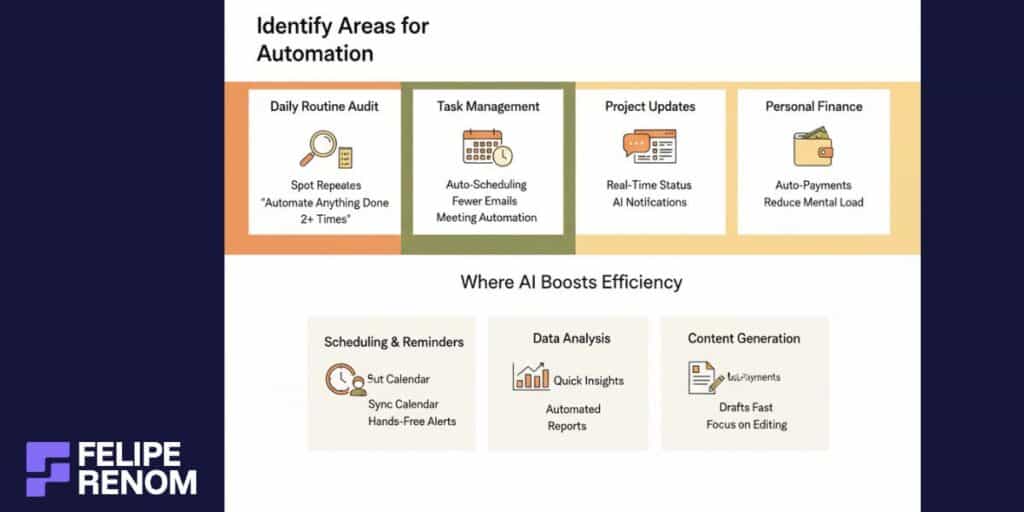
Analyze Your Daily Routine
Take a good look at your daily routine and ask, “What keeps repeating that doesn’t need my personal touch?” This self-audit was a big eye-opener for me.
- Task Management: Working on multiple client projects meant a constant stream of emails and meetings. Automating scheduling with tools like Calendly cleared my plate of back-and-forth communications.
- Project Updates: Repeatedly checking project statuses? I used AI chatbots to give me real-time updates on the status of each project. Trust me, this does wonders to free up your time.
- Personal Finance: Managing bills and finances manually was messing with my head. Automating payments through finance apps practically saved my sanity.
This was the biggest lesson I learned: automation isn’t just about saving time; it’s about reclaiming your energy and focus.
Mapping out these repetitive tasks, I saw a pattern. Anything I did more than twice deserved automation!
Consider Areas for AI Efficiency
Now, think about where AI can step in to make life easier. It’s not just about cutting tasks but improving efficiency too.
- Scheduling & Reminders: Smart assistants can sync with your calendar. Setting reminders for meetings or deadlines is hands-free, which is HUGE!
- Data Analysis: Running through heaps of data manually took me ages. With AI-powered analytics, insights popped up in minutes.
- Content Generation: In my AI development role, creating outlines or summaries took time. AI platforms can generate a first draft, letting me focus on fine-tuning.
When I first figured out how to automate your life with AI for scheduling, it was like a weight was lifted. My days felt less chaotic, and I could FINALLY focus on what mattered.
When prioritizing tasks:
| Task Type | Automation Potential | Personal Involvement Needed |
|---|---|---|
| Emails | High | Low |
| Meeting Scheduling | High | Low |
| Strategic Planning | Low | High |
Understand where tech can do the heavy lifting. Freed from mundane tasks, that’s where the magic happens. You’ll find yourself more engaged and productive throughout the day.
Don’t forget: Start small. Tinker, adjust, and let automation work its wonders gradually.
Breaking down tasks, you’ll notice patterns of automation-ready activities. Once you start, there’s no looking back. It’s not just about tech–it’s about optimizing life!
2. Choose the Right AI Tools
Researching AI tools can feel like staring at an open sea, overflowing with countless options. So MANY choices make it overwhelming, especially when you’re trying to automate your life with AI. When I started, it took trial and error to find what truly aligned with my needs.
Research AI Tools that Suit Your Lifestyle Needs
Picking the right tools is a bit like finding the perfect pair of shoes, they need to fit your lifestyle comfortably.
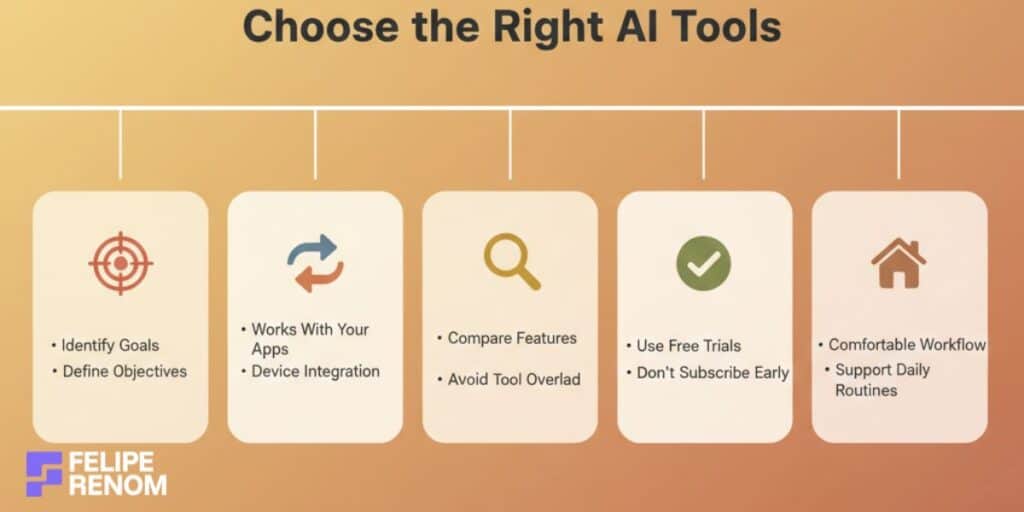
My journey started with endless research. I quickly learned the importance of knowing what you need before diving in. A cluttered digital arsenal can bog you down more than help. Focus on these areas:
- Identify Your Goals: Define your automation objectives clearly.
- Assess Compatibility: Check if the tools sync with what you currently use (like your calendar or existing smart devices).
- Trial Options: Most AI tools offer free trials, use them to test how they fit into your daily grind.
My initial mistake was not trialing first, diving head-first into subscriptions hurt my wallet. Learn from my blunder: don’t commit until you’re certain!
Compare Features, Usability, and Integration Capabilities
When comparing tools, think about usability, features, and how well they fit into your current ecosystem. This takes the guesswork out of choosing and ensures a smoother integration.
| AI Tool | Usability | Integration Capabilities | Notable Features |
|---|---|---|---|
| Zapier | User-friendly | Extensive app support | Automate multi-step processes |
| Make.com | Moderate learning curve | Effective in cloud platforms | Scenario customization |
| Google Assistant | Highly intuitive | Broad device range | Voice-activated routines |
I found Zapier’s multi-step automation invaluable. It linked my email and calendar, saving hours each week. HOWEVER, don’t forget to weigh the cost. Zapier’s price can stack up with advanced usage.
ONE important insight: Test out how different tools integrate before fully committing. You’ll quickly see if they’re compatible with your workflow.
Select AI Applications Offering the Best Value and Support
The best tools offer strong value and solid customer support, ensuring a balancer between ROI and usability.
Here’s how I tackled it:
- ROI Evaluation: Weigh the cost against time/productivity saved.
- User Support: Check for active communities or support teams. This can be a lifeline when you’re stuck.
- Updates and Upgrades: Ensure the tool continuously evolves to remain relevant and useful.
I remember how a tool’s limited customer support left me stranded. A strong support network can make a WORLD of a difference when a snag hits.
Choosing wisely will make automating life a whole lot smoother and more satisfying. As you streamline your daily hustles, you’ll notice a remarkable change in time management and productivity, making life significantly easier and far more efficient.
3. Set Up Smart Home Devices
Investing in AI-powered smart home devices was one of the BEST decisions I’ve made to automate my life with AI. Picture this: you walk into your home, and your lights turn on, the thermostat adjusts to your favorite temperature, and your preferred playlist kicks in. It’s like magic! These devices not only make your life more convenient but also add a touch of FUTURISM to everyday living.
Invest in AI-Powered Smart Home Devices
Getting started with smart devices can be a GAME-CHANGER when you’re figuring out how to automate parts of your life with AI. I remember the first time I installed smart lighting, it felt like stepping into a new era of comfort and efficiency. Here’s how you can start:
- Smart Lighting: Philips Hue or LIFX offers lighting systems that you can control from your phone or voice. Perfect for setting the mood or just ensuring you never come back to a dark home.
- Thermostats: Devices like the Nest Learning Thermostat not only control the temperature but also learn your habits, optimizing energy use.
- Entertainment Systems: AI-powered speakers like Sonos integrated with Google Assistant or Alexa can curate playlists or adjust volumes based on your preferences.
Why are these worth the investment? Because they save you time and energy. When your environment adjusts without manual interference, it frees up so much mental bandwidth. Plus, energy savings mean they kinda pay for themselves over time!
Remember, the initial setup might be pricey, but the LONG-TERM benefits are incredibly rewarding.
Ensure Compatibility with Your Existing Home Network
Before diving in and buying devices, ensure they’re compatible with your current setup. This is SUPER important, and trust me, figuring this out late in the process can be frustrating.
When setting up smart devices, compatibility is KEY. You want them to play nice with what you have, and that means doing a bit of homework:
- Check Network Compatibility: Make sure your Wi-Fi is stable since these devices often rely on it for connectivity. Some may require 2.4GHz networks, so double-check!
- Home Ecosystem Alignment: If you already use Google Home, stick with devices that are compatible. Mixing ecosystems can lead to headaches and setup issues.
- Protocol Matching: Some devices use Zigbee or Z-Wave, so ensure your hub supports the protocol.
| Device Category | Protocols | Compatible Systems |
|---|---|---|
| Smart Lights | Zigbee | Google Home, Alexa |
| Thermostats | Wi-Fi | Nest, SmartThings |
| Cameras | Z-Wave | Ring, Arlo |
I didn’t originally check compatibility and found myself with a snazzy gadget that didn’t integrate well. Avoid this pitfall by confirming everything meshes well together BEFORE buying.
Configure Settings for Optimal Performance and Convenience
Once you’ve installed these smart gadgets, setting them up for optimal use is crucial. You want them to enhance your living, not disrupt it!
Setting things up can be a little tricky, but it’s well worth it. Here’s how I managed:
- Routine Setup: Program daily routines, like having lights dim at sunset or the thermostat lower when you head to bed.
- Voice Commands: Customize voice controls for a truly hands-free experience. Saying “movie night” can dim the lights and start your favorite film!
- Security Alerts: Set up cameras or smart locks to notify you of unusual activity, keeping you safe and aware.
Initially, configuring these settings felt like a CHORE, but once dialed in, the convenience was unmatched. Having my environment adapt was a revelation, suddenly, I felt like a conductor orchestrating my living space.
The big takeaway: Nail the setup and trial different configurations. The comfort and ease are SO worth it.
Embrace the tech and integrate AI into your daily life effectively. The journey will crash through any hesitation and elevate your lifestyle.
4. Implement AI Personal Assistants
AI personal assistants like Alexa, Google Assistant, and Siri have etched themselves into our daily routines, becoming indispensable helpers. They bring not just functionality but a dash of futuristic flair to mundane tasks. For me, incorporating an AI personal assistant was a GAME-CHANGER; it refined how I manage tasks and seamlessly intertwined tech with ordinary life.
Explore AI Personal Assistants
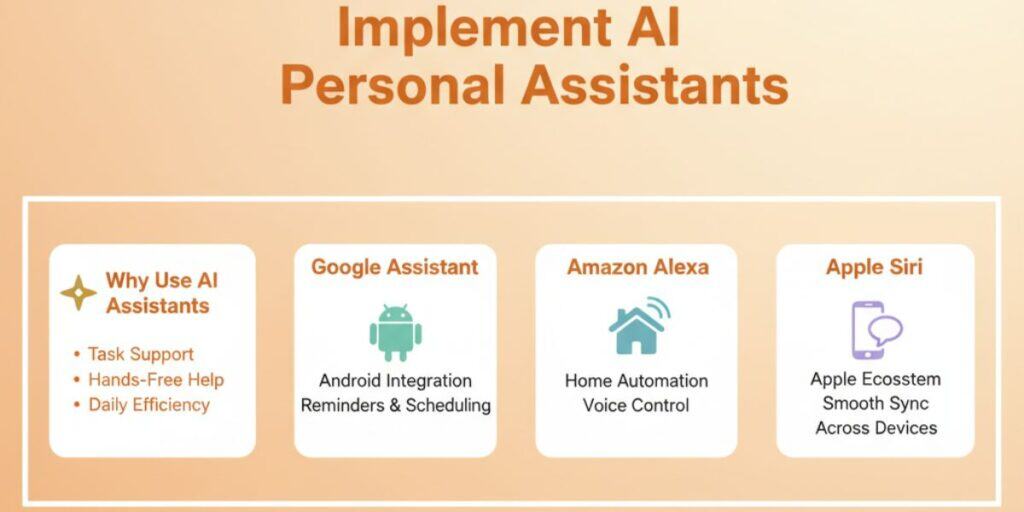
Navigating the options of AI assistants might seem daunting, but trust me, it’s worth the effort. I started with Google Assistant, and now, I can’t imagine life without it. Here’s how you can start:
- Google Assistant: Offers seamless integration with Android devices, making it super handy for managing calendars and setting reminders.
- Amazon Alexa: Great for home automation; pairs perfectly with smart devices and controls effortlessly through voice commands.
- Apple Siri: Best for those invested in Apple’s ecosystem, ensuring smooth operation across iPhone, iPad, and Mac.
| AI Assistant | Best For | Notable Features |
|---|---|---|
| Google Assistant | Android Integration | Voice-controlled scheduling |
| Amazon Alexa | Home Automation | Skill-enabled routines |
| Apple Siri | Apple Ecosystem | Hands-free commands |
Important insight: Pick an assistant that aligns with your tech ecosystem. An overwhelming variety of options will only clutter what should be a streamlined experience.
Set Up and Customize Your Assistant
Customizing your personal assistant can enhance your productivity and make everyday tasks feel like a breeze. Initially, I dived in without customizing settings, and let me tell you, missing that step was a MISTAKE. Here’s how to tailor it to fit your needs:
- Routine Creation: Set up morning and evening routines. For me, Alexa wakes me up, gives a weather update, and queues my morning coffee playlist.
- Task Management: Use voice commands to manage to-dos. Google Assistant keeps my task list updated without lifting a finger.
- Location-based Reminders: Siri reminds you of tasks when you arrive or leave a location, say goodbye to forgotten errands!
Customization turns these assistants into personal productivity powerhouses. When set to sync with your life, the efficiency boost is IMMENSE.
Use Voice Commands and Routines
Voice commands and routines reshape how you approach daily activities. They cut through the clutter, creating a streamlined experience. When I first started using routines, it felt like I had an extra pair of hands!
Here’s how it helps:
- Voice Commands: Simple phrases can trigger complex actions; for instance, saying “Goodnight” might lock all doors and dim lights.
- Routine Usage: Automate regular actions, like playing a workout playlist when you start exercising. This minimizes interruptions and keeps you on task.
- Smart Integrations: Connect them with other devices for a cohesive tech ecosystem. I set my Google Assistant to remind me to take breaks during work, synced with my digital calendar.
The wow moment: I realized how to automate your life with AI when everything started working together seamlessly. Having tasks managed with minimal input feels futuristic.
Embracing AI personal assistants is about creating synergy between your tech and routine. The time saved and mental load reduced truly empowers you to focus on what matters. Let these virtual assistants tackle the day-to-day, making life not just simpler, but better.
5. Leverage AI for Task Management
Bringing AI into task management was a TOTAL game-changer for me. As a freelance AI developer, juggling multiple projects and deadlines became a lot simpler when AI took over. It’s like having an extra pair of hands keeping you organized, especially when you’re overwhelmed with to-dos.
Employ AI-driven Apps to Organize and Prioritize Tasks
AI-driven apps literally revolutionized how I kept my tasks in check. They learn from your habits and help prioritize what truly matters. Personally, I’ve seen my productivity SKYROCKET by using them.
- Todoist with AI: This tool uses AI to prioritize tasks based on your history and behavior. When I first used it, the way it reshuffled my daily priorities was almost magical.
- Trello with Automation: Integrating AI into Trello allowed me to set and forget tasks. It assigns due dates and moves cards as tasks progress automatically.
- Microsoft To Do: With AI suggestions, it reminds me of tasks at optimal times, nudging me about that upcoming deadline without being intrusive.
Biggest takeaway: AI doesn’t just organize, it learns and adapts, which boosts focus and efficiency.
Sync Task Management Tools with Calendars and Reminders
One of the pivotal moves was syncing my task management tools with calendars and reminders. Synchronization was SO crucial for avoiding overlaps and missed deadlines.
- Google Calendar Integration: Pairing my task apps with Google Calendar lets everything be visible in one place. It’s much easier to glance at my week and see the whole picture.
- AI-driven Reminders: These aren’t your standard ones. They track how often tasks are postponed and suggest optimal completion times based on patterns.
Here’s how some tools compare when it comes to integration:
| Tool | Ease of Sync | Standout Feature |
|---|---|---|
| Todoist | Seamless | AI task prioritization |
| Trello | Good | Card automation |
| Microsoft To Do | Excellent | Intelligent suggestions |
When all your tools talk to each other, it’s like they’re working in HARMONY, drastically improving how your day unfolds.
Automate Recurring Tasks and Deadlines for Improved Productivity
Automating recurring tasks was a lifesaver both professionally and personally. When you’re piling up work, these automations let AI handle the monotony.
- Meeting Schedules: I automated weekly client meetings using simple AI scripts that send calendar invites based on time zones. It made scheduling a BREEZE!
- Email Follow-ups: Using AI tools that send reminders or responses automatically saved hours every week on back-and-forth emails.
- Task Assignments: In team settings, AI manages who does what, based on workload and skillsets. It keeps everything balanced without my constant oversight.
Remember: Reducing the manual effort involved in recurring tasks lets you focus on innovation and GROWTH.
AI-driven task management transforms your workflow, offering a structured and prioritized approach to tackling your to-dos. As you take these steps, you’ll find yourself with more time and less stress, able to focus on creating real value in your work and personal life. If you’re interested in optimizing your business processes further, don’t hesitate to book a FREE consultation with me here. Let’s dive into how to automate your life with AI together!
6. Enhance Security with AI
Having robust security is a game-changer in today’s world, and AI can be a powerful ally in this endeavor. Imagine knowing your home is protected, even when you’re miles away, thanks to AI security systems. This isn’t just tech jargon, it’s peace of mind. Let’s dive into how to automate your life with AI to bolster your home’s security.
Integrate AI Security Systems for Home Monitoring and Alerts
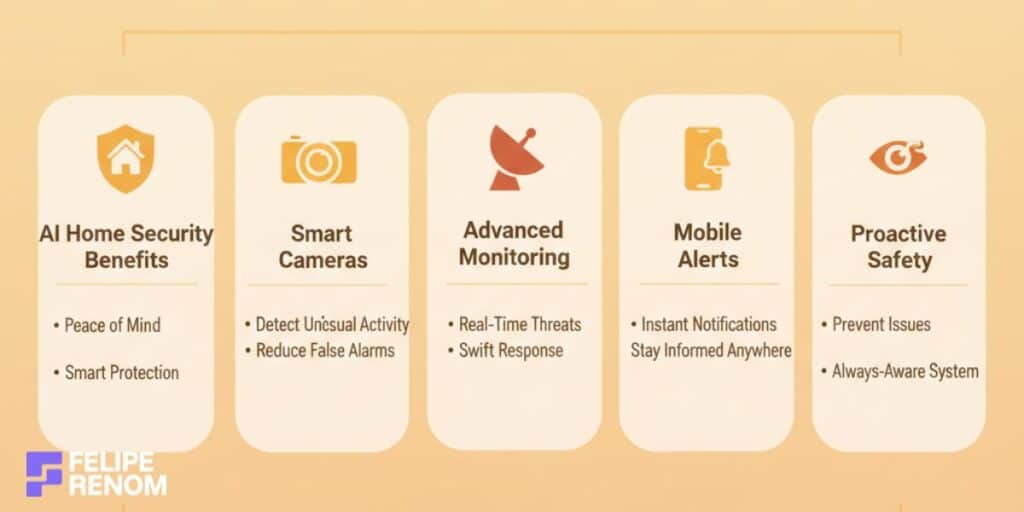
Integrating AI security systems brought an incredible shift in how I manage home safety. These systems offer more than just surveillance, they provide real-time insights and automatic alerts, ensuring that you’re always in the loop.
- Smart Cameras: They use AI to differentiate between usual and unusual activities, reducing false alarms. When I installed them, it significantly cut down on unnecessary panic alerts.
- Advanced Monitoring: AI-driven systems notify you of potential threats, allowing you to react swiftly. It’s comforting knowing my home is under vigilant watch without constant manual checks.
- Mobile Alerts: With AI, I receive real-time alerts straight to my phone, keeping me informed no matter where I am. That alert about a package delivery while I was in a meeting? LIFE-SAVER.
Here’s the key: AI security systems are about staying ahead of potential issues, not just reacting to them.
Utilize AI-Powered Cameras and Sensors for Enhanced Safety
AI-powered cameras and sensors stepped up my security game to a whole new level. These tools aren’t just for recording events; they proactively enhance safety.
- Facial Recognition: Cameras equipped with AI can identify familiar faces, buzzing you only when needed. This tech WOWED me with its precision.
- Motion Detection: AI sensors are fine-tuned to detect specific movements, gauging threats accurately. It cut down false alarms from, say, pets roaming around.
- Environmental Sensors: From smoke to water leaks, AI sensors ensure every part of your home is monitored. The peace of having sensors flag an early water leak was HUGE for preventing potential damage.
| AI Tech | Advantage | Potential Use |
|---|---|---|
| Facial Recognition | Precise alerts | Entry security |
| Motion Detection | Accurate threat detection | Perimeter safety |
| Environmental Sensors | Comprehensive monitoring | Utility protection |
When adding these to your security arsenal, it’s critical to select equipment that integrates seamlessly with your existing setup. They should complement, not complicate.
Regularly Update Security Protocols and Settings to Maintain Protection
This one’s crucial: always keep security settings current. Just like any tech, your AI systems need regular updates for optimal functionality. I learned this the HARD way when I ignored updates and faced glitches.
- Firmware Updates: Devices receive updates to patch vulnerabilities. Skipping them? Not an option; ensure they’re up-to-date.
- Configuration Checks: Periodically review your system’s settings. I make it a point every month to check alert settings and permissions, prevents surprises!
- Backup and Recovery Plans: AI systems can monitor data, but ensure everything’s backed up. Having a recovery plan was my safety net when tech didn’t play nice.
Take note: Regular updates and maintenance of security systems cannot be overlooked. They’re the linchpin of sustained protection.
Maintaining security with AI isn’t a set-and-forget task; it’s about engaging with the system actively. Stay vigilant, and let AI do the heavy lifting, bringing unparalleled safety to your home. If you’re curious about how to tailor these advancements to your needs, consider a FREE consultation with me here. Let’s ensure your peace of mind is always just a click away!
7. Monitor and Adjust Your AI Systems
After setting up AI systems to automate your life, regularly monitoring and adjusting them is crucial to maintaining efficiency. I can’t stress enough how keeping an eye on these systems has been a game-changer in catching glitches before they become major headaches. Even the BEST AI setups aren’t perfect and require fine-tuning to fit evolving needs.
Regularly Review AI System Performance
Checking up on your AI systems isn’t just a nice-to-have; it’s ESSENTIAL. On one occasion, I discovered my AI chatbot was glitching and misinterpreting queries because I hadn’t reviewed it in months. This taught me the value of consistent performance checks.
- Performance Metrics: Regularly review metrics like response time and error rates. Catch issues early to prevent downright mess-ups.
- Feedback Loop: Implement systems for user feedback. Often, users will notice performance hits before you do.
- Update Schedules: Keep an eye on software updates that can fix bugs or add new features.
Pro tip: Regular reviews uncover hidden inefficiencies. Use them as opportunities for improvements.
Neglecting regular reviews could mean your system lags behind or doesn’t meet expectations, don’t let that happen. Make regular checks part of your routine.
Make Necessary Adjustments for Improved Efficiency
I won’t lie, sometimes, even with regular reviews, my systems still needed a tweak or two for better results. Adjustments are your best friend for keeping things SMOOTH and user-friendly.
- Workflow Adjustments: Modify workflows when they don’t match the current needs. Remove redundant steps to streamline processes.
- User Experience (UX) Improvements: Enhancing UX is vital. Sometimes a little nudge here and there makes a world of difference in user satisfaction.
- Flexibility: Keep your system adjustable to accommodate changes in user behavior or goals.
When I noticed that my AI systems weren’t adapting to new user behaviors, tweaking parameters made all the difference. It turned a frustrating experience into a user-friendly one.
Stay Updated with AI Innovations and Enhancements
With the AI landscape evolving rapidly, staying informed about new technologies is critical. Initially, I found this daunting, but now, it’s an exciting part of my routine.
- Industry News: Regularly read up on AI trends and innovations. Knowing what’s out there helps you foresee integrations.
- Incorporate Advanced Tools: Adopt emerging tools to stay competitive. Learning to automate your life with AI means constantly evolving with technology.
- Community Engagement: Join forums or groups focused on AI development for shared insights and experiences.
| Innovation Source | Why It’s Important | How to Stay Updated |
|---|---|---|
| Blogs & Articles | Current trends | Subscribe to newsletters |
| Conferences | Networking & Learning | Attend webinars |
| Online Forums | Real-world insights | Join tech communities |
Biggest lesson: Being proactive about updates means your AI integration won’t just survive, it’ll THRIVE.
Adjusting, learning, and evolving with your AI systems creates a dynamic environment that responds to changing needs and technology. So, keep monitoring, keep adjusting, and keep exploring new possibilities in AI innovation. If you’re looking to further optimize your systems, feel free to book a FREE consultation with me here. Let’s make sure your AI systems keep RUNNING LIKE A DREAM!
Key Considerations for Successfully Automating Your Life with AI
Navigating the world of automation might seem daunting at first. TRUST ME, I’ve been there. Knowing how to automate your life with AI is not just about hopping on the tech bandwagon, it’s about making mindful decisions that enhance your everyday routine without sacrificing the human touch.
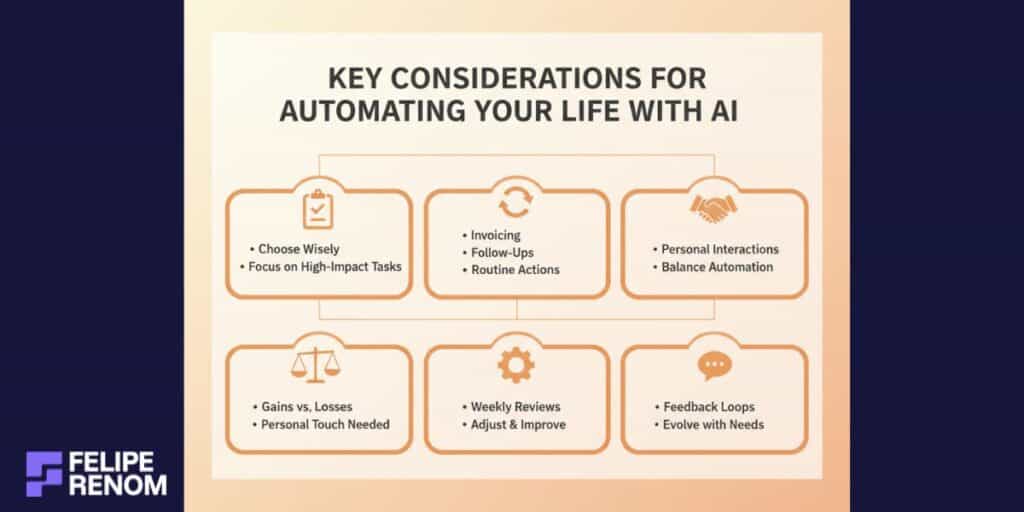
Be Selective About Tasks to Automate
Not every task is cut out for automation. I’ve learned to get picky about what truly benefits from AI integration. In my freelancing journey, automating repetitive processes saved me HOURS. But, overdoing it can lead you to lose personal connection, an essential part of any business or daily interaction.
- Prioritize Repetitive Tasks: Identify what you frequently repeat. For me, automating client invoicing and email follow-ups was a NO-BRAINER. These tasks didn’t require a personal touch every time.
- Balance Needed: Keep a balance between automated and personal interaction. I make sure my initial client consultations are personal to build trust before automating routine updates.
- Assess Impact: Consider the impact. Some tasks may seem automatable but lose essential human elements. Carefully evaluate every automation decision by measuring potential gains against loss in personal engagement.
| Task Type | Automation Potential | Personal Touch Needed |
|---|---|---|
| Invoicing | High | Minimal |
| Client Onboarding | Moderate | High |
| Data Analysis | High | Low |
Takeaway: Choose your automation battles wisely. High potential tasks with low personal touch are golden nuggets.
Continuously Refine AI Systems
Automation isn’t a set-and-forget kind of deal. I’ve had my fair share of bumps simply because I didn’t tweak my systems regularly. Tweaking keeps them effective and ALIGNED with evolving needs.
- Regular Reviews: Set a schedule to review system performance. I reserve time weekly to see which aspects of automation are saving me time and which ones need a revamp.
- Feedback Loops: Implement systems for gathering feedback. This helps identify glitches and adapt to shifts in demand.
- Evolve with Needs: Your needs change, and your systems should too. I often reassess the tools I use with clients as their business grows.
Remember, it’s about maintaining consistency and relevance. I’ve skipped system checks before, and trust me, small issues snowball into bigger hurdles if ignored.
Reminder: Refining your AI systems is like tending a garden. Neglect leads to a few stubborn weeds that are harder to uproot later.
Balancing automation with the personal touch and ensuring regular system refinement are key to successfully automating your life with AI. It’s a dynamic process requiring attention, but the rewards in efficiency and productivity speak volumes. If you’re interested in harnessing AI to elevate your workflow, book a FREE consultation with me here. Let’s create processes that work seamlessly for you!
Taking it to the Next Level: How to Maximize AI in Your Life
Leveraging AI in your daily life can feel like unlocking a secret level of productivity and convenience. Seriously, once you figure out how to automate your life with AI, you won’t look back. It’s about not just streamlining tasks, but using AI to ADAPT and GROW with you over time. Let’s explore how you can take things up a notch.
Dive into Advanced AI Solutions
Exploring more advanced AI tools is the next logical step once you’ve got the basics down. These aren’t just static features, AI solutions are constantly learning and evolving. I’ve personally embraced AI learning algorithms that adapt to my preferences, essentially functioning like a personal assistant that grows more intuitive every day.
- Learning Algorithms: These tools, like Google’s AI-powered suggestions, adapt over time to better fit your habits. Initially, I was hesitant, but watching how they tuned into my needs, like recommending my usual morning coffee mix, was AWESOME.
- Data-Driven Decision Making: Implement AI tools that help analyze patterns in your daily habits. You’ll gain insights that weren’t apparent before, such as when you’re most productive or what tasks hold you back.
| Advanced AI Tool | Feature | How It Helps |
|---|---|---|
| Google Algorithms | Learning preferences | Personalized suggestions |
| AI Analytics Tools | Data analysis | Reveals behavioral patterns |
Engaging with these solutions transforms AI from a static feature to a dynamic tool, supporting your daily flow in tailored ways.
Key takeaway: Embrace adaptable AI solutions to make your systems smarter over time.
Engage with AI Communities and Stay Informed
When I first dipped my toes into the world of AI, it was overwhelming. Luckily, communities and forums became my go-to resources. They’re INVALUABLE for staying updated on AI trends and sharing insights.
- Join AI Centers: Platforms like Reddit’s AI subreddits or specialized forums are great places to learn from others and share your insights.
- Networking: Engage with industry professionals through online meetups or webinars to get fresh perspectives. I found interacting with forum members led to tips on under-the-radar tools.
Look at these ways to engage with the community:
| Community Type | Benefits | Tips to Maximize |
|---|---|---|
| Forums | Shared knowledge | Participate actively |
| Webinars | Direct learning | Ask questions live |
| Networking Events | Personal insights | Build connections |
Important insight: Being part of an AI community keeps your finger on the pulse of tech developments.
Alternatives to Automating Your Life with AI
Navigating the landscape of AI can feel overwhelming, and it’s perfectly okay to seek alternatives. If you’re cautious about diving headfirst into AI for automation, there are PLENTY of options to gradually introduce convenience and streamline your life without full AI integration.
Simpler Automation Tools
Let’s start with the basics. Not all automation has to involve complex AI systems. When I first began optimizing my workflow, I discovered a wealth of simpler tools that offered significant benefits without the bells and whistles of AI.
- Task Management Apps: Tools like Todoist or Trello are excellent at keeping you organized. They’re user-friendly and highly effective for structuring daily tasks.
- Smart Devices: Gadgets like Wi-Fi lightbulbs or smart plugs can simplify home management. These allow remote control and scheduling, making life a bit easier.
- Calendly: This non-AI scheduler changed how I handle meetings. By automating appointment booking, it transformed back-and-forth emails into seamless scheduling.
| Tool | Feature | Ease of Use |
|---|---|---|
| Todoist | Organizes tasks | Very simple |
| Smart Bulbs | Light scheduling | Plug and play |
| Calendly | Automates scheduling | Easy |
It’s crucial to start small and choose tools that are intuitive. You don’t need to leap straight into AI to achieve automation.
By leveraging these tools, you strike a balance between efficiency and simplicity, gradually easing into more complex systems when ready.
Human-Centric Approaches
If technology feels too impersonal, sometimes the best ‘automation’ is human-based. Having worked with diverse international clients, I’ve seen firsthand the benefits of injecting a human element into productivity strategies.
- Personal Assistants: Hiring a human assistant adds a personal touch, bringing adaptability that even cutting-edge AI struggles to match. They’re ideal for handling nuanced tasks that tech can’t tackle.
- Contracted Services: Engaging freelance workers for repetitive tasks can free up valuable time, allowing you to focus on strategic areas.
- Personalized Consulting: Sometimes, a session with a knowledgeable consultant can streamline your work approach, identifying key areas for improvement.
At one point, I debated automating my client onboarding process. Instead, I chose to maintain a human-centric approach, ensuring I personally connected with each new client to build rapport.
Human solutions bring warmth and adaptability, enriching interactions in ways AI has yet to replicate.
These alternatives offer a way to enhance convenience without fully leaning on tech. They provide flexibility, nurturing a blend of automated and personal experiences, ideal for those wary of diving into the AI pool headfirst.
Final Thoughts
Embracing the journey of how to automate your life with AI can be a transformative experience. By integrating AI tools and smart devices, you unlock a world of efficiency and simplicity, allowing more time for what truly matters. Whether it’s managing daily tasks, enhancing home security, or utilizing AI personal assistants, the steps outlined in this guide provide a clear path to an AI-driven lifestyle. Now is the perfect time to start small, choose the right tools, and gradually expand your automation strategies.
Continue Reading: Ready to take it further? Read How to Use AI for Productivity (Full Beginner Guide) to deepen your understanding and discover more ways to enhance your productivity with AI.