
How to Use AI for Time Management: Maximize Productivity in 2026
“Time is what we want most, but what we use worst,” said William Penn. In today’s fast-paced digital age, this sentiment rings truer than ever. If you’ve ever found yourself drowning in deadlines and to-do lists, you’re not alone. Back in my early freelancing days, I grappled with managing my time efficiently, constantly feeling overwhelmed by endless tasks. Enter 2026, and the landscape has shifted dramatically, thanks to the revolutionary potential of AI.
Discovering how to use AI for time management was my turning point, transforming chaos into clarity. Imagine AI as your personal assistant, seamlessly organizing your schedule, prioritizing tasks, and even automating repetitive duties. It’s like having a 24/7 productivity partner that never sleeps, ensuring you focus on what truly matters, whether that’s growing your business, pursuing personal passions, or achieving work-life balance.
In this blog post, I’ll guide you through the step-by-step process of harnessing AI to optimize your time. From identifying your needs to selecting the right AI tools, you’ll learn practical strategies that can elevate your productivity. Curious about how AI can reshape your daily grind? As I covered in how to use AI for productivity, the benefits are immense.

Table of Contents
Step-by-Step Instructions to Harness AI for Time Management
Back in my early freelancing days, managing my time felt like working on eight different balls, never easy and always overwhelming. Fast-forward to 2025, using AI for time management has transformed the way many of us organize our days, myself included. With the right tools, you can simplify your schedule, prioritize what matters, and protect your time and energy. Here’s how the process works, step by step.
Identify Your Time Management Needs
Ever felt like you’re running on a hamster wheel, doing a million tasks but still getting nowhere? Yeah, I’ve been there too. Understanding your unique time management challenges is CRUCIAL before you can leverage AI effectively. Trust me, being aware of what trips you up is half the battle won.
Assess Your Current Productivity Levels
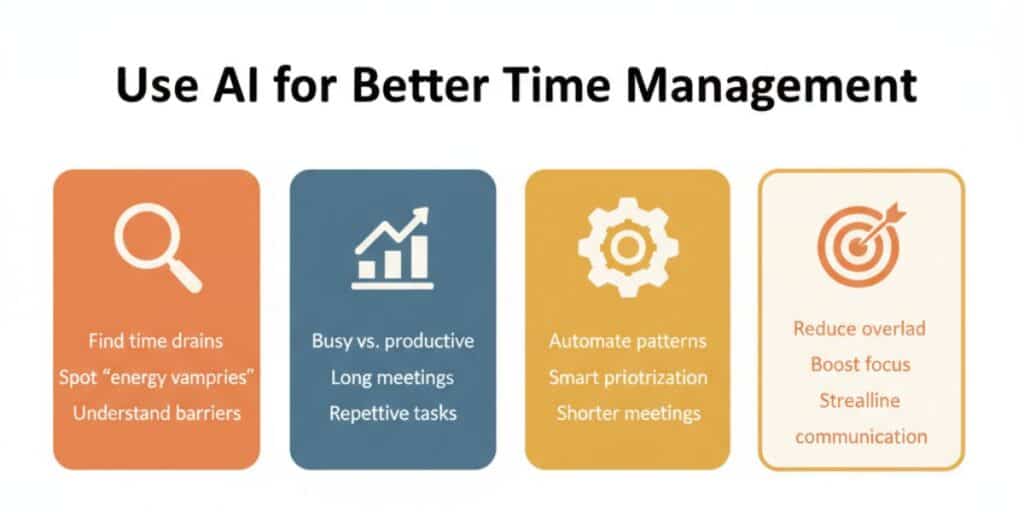
In my early days of freelancing, I thought I was SUPER productive. But a closer look revealed I was just REALLY busy. Take a moment to evaluate where you stand. Look at your daily grind:
- Which tasks are eating up too much of your time?
- Are certain meetings dragging on and going nowhere?
- What repetitive chores could someone (or something) else handle?
For me, answering similar client questions over emails was a time drain. Recognizing these “energy vampires” can guide you in using AI for time management more effectively.
The biggest aha moment for me: Understanding your true barriers helps streamline what AI solutions you need.
Determine Areas for AI Impact
Once you pinpoint your sticky spots, it’s time to consider where AI can swoop in and save the day. Not all tasks are created equal when it comes to AI intervention.
- Look at tasks that involve regular patterns, they’re ripe for automation.
- Consider areas needing enhanced decision-making, like task prioritization.
- Reflect on whether trimming meeting times would significantly boost your productivity.
In my experience, automating client data entry and task prioritization changed everything. I suddenly had hours back to focus on work that truly moved things forward.
| Area | AI Solution | Impact |
|---|---|---|
| Client Emails | AI Chatbots | Faster, consistent replies |
| Task Prioritization | AI Task Managers | Better focus on priorities |
| Meeting Times | AI Scheduling Tools | Shorter, more efficient meetings |
Consider where AI will create the most significant impact; this focus will dictate your strategy moving forward.
Align AI with Your Specific Goals
Next, think about your objectives and how AI can help you reach them. Maybe it’s reducing your screen time or spending more brainpower on creative tasks. The question is: What’s your end game?
- Do you want to chop down on unnecessary meeting times?
- Is improving task prioritization your ultimate goal?
- Are you keen on streamlining communication?
When I realized that my goal was more strategic thinking over task execution, using AI tools became more straightforward. It not only uplifted my productivity but ensured I was spending energy where it mattered.
Focus on solving for goals instead of just adding tools. AI is a means, not the end.
Key Keywords to Remember
To really nail this process, remember the phrase “how to use AI for time management.” Having AI understand your needs is the foundation to maximizing your productivity.
By understanding these areas, you position yourself to use AI effectively. Take a moment to examine your current workflow, and let AI support the way you work. Awareness is the first step toward reshaping your daily approach.
Select the Right AI Tools for Your Workflow
It’s EASY to feel lost in the AI jungle, with countless tools shouting for your attention. Trust me, I’ve been through that maze. Finding the right AI tools is like dating, what works for one might not work for another. But when you find the RIGHT match, it feels like magic, freeing you from everyday chaos.
Research AI Tools Geared Toward Time Management
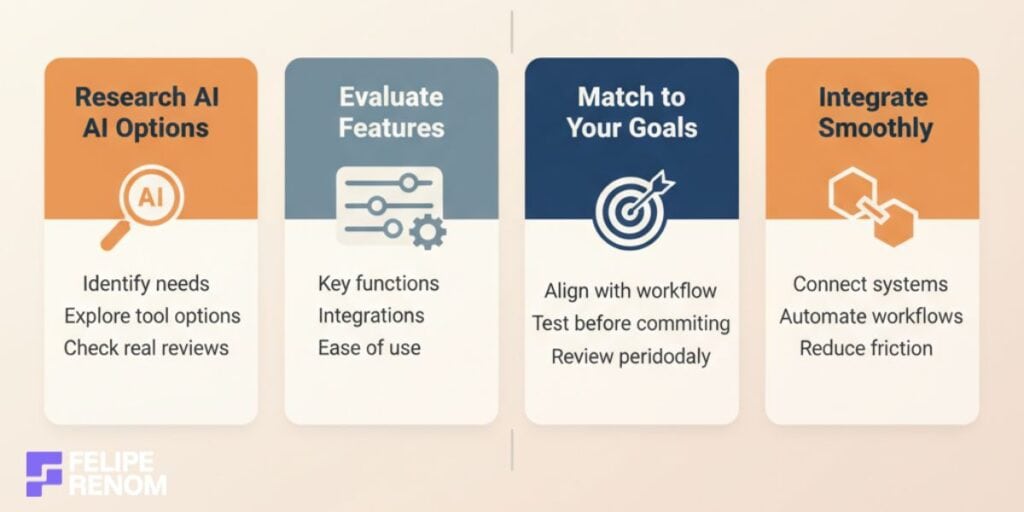
To kick off your quest, start by digging deep into AI tools designed specifically for time management. It’s incredible how AI can transform your daily grind when you find the right one.
In my experience, using AI-powered tools such as calendar assistants and task managers has completely reshaped the way I work. Here’s how you can get started:
- Identify specific needs: Know what you’re trying to solve, whether it’s improving meeting efficiency or task automation.
- Explore options: Tools like Toggl, Clockify, and Trello offer AI features to help manage tasks and schedule efficiently.
- Filter based on reviews: Check out user reviews to understand real-life experiences, this isn’t just about star ratings but digging into the detailed feedback.
This targeted approach gives you a chance to get tools tailored to your work style rather than adopting a one-size-fits-all solution.
My biggest takeaway: Knowing what you absolutely need helps in sorting through the clutter.
Evaluate Features and Integration Capabilities
Once you have your wishlist, the next step is a little more technical but just as crucial, assessing the features and integration capabilities. Each tool has its own personality. Some might fit you like a glove, others… not so much.
Take the time to compare different features:
| Tool | Features | Integration Capability |
|---|---|---|
| Trello | Task management, timeline view | Integrates with Slack, Google Drive |
| Todoist | Task prioritization, project goals | Connects with Dropbox, Alexa |
| Notion | Customizable layout, knowledge base, project tracking | Links with Google Calendar, Zapier |
- Assess key features: Want automatic reminders? Choose tools with personalized alerts.
- Check integration: If a tool doesn’t play well with others, using it might feel like work instead of help.
- Consider usability: Tools should feel intuitive, not like you’re assembling a rocket.
During my journey, I discovered that seamlessly connecting workflows using integrations increases productivity tenfold!
I found out that ease of integration can be the tie-breaker. When a tool speaks the same language as the rest of your systems, it’s a WIN.
Choose Tools That Align with Your Specific Needs
With so many choices, the final trick is to ensure alignment with your goals. I learned this the hard way when I jumped onto a popular AI bandwagon only to find it was not for me.
Here’s how you can save time and pick the right ones:
- Match to objectives: The tool should align smoothly with your current and future goals.
- Pilot testing: Use free trials or start with a basic service package before jumping in fully.
- Review frequently: Your needs can change, be open to revisiting your choices.
This strategy ensures that the tools you opt for not only solve immediate problems but also grow with you.
The major lesson in my AI toolkit saga? Stick with what complements your workflow; don’t get java happy just for the COOL factor.
Remember, understanding how to use AI for time management is the key. Each tool you adopt should make life seamless and focused, ultimately allowing you to scale productivity, not stress. Pick wisely, and let AI become your unwavering partner in efficiency!
Integrate AI with Your Existing Systems
Integrating AI with your current systems might sound like a technical nightmare, but TRUST ME, it’s easier than it seems. The idea is to make AI your buddy, helping you smooth out workflows and make things run like a WELL-OILED MACHINE. Let’s dive into how you can seamlessly make AI a part of your everyday operations.
Seamlessly Integrate AI Tools into Your Existing Workflow
When I first started integrating AI tools, I was a bit anxious. The thought of having to alter my daily operations was daunting. But here’s the thing, you don’t have to overhaul your entire system in one go. Start small.
- Identify Key Processes: Pinpoint repetitive tasks where integration can save time.
- Gradual Implementation: Begin with a simple tool like automating email responses.
- Monitor Efficiency: Regularly check if these integrations meet your productivity goals.
In my freelancing work, integrating AI to manage client emails made a noticeable difference. The repetitive back-and-forth was handled automatically, giving me back a substantial amount of time.
| Task | AI Tool | Impact |
|---|---|---|
| Email Automation | AI Email Response Bots | Reduced email hours |
| Calendar Sync | AI Scheduling Assistants | Improved meeting efficiency |
Initial integration might require minor tweaks, but persistence pays off. It streamlines your work significantly over time.
Connect AI Tools with Your Current Digital Platforms
Once you’re comfortable with basic integrations, it’s time to delve deeper. Connecting AI tools with existing digital platforms like email, calendars, or project management tools can AMP UP your efficiency levels massively.
Think about it:
- Link Email and Calendar: I synced AI scheduling assistants with my Google Calendar. It helped avoid double bookings with clients.
- Use AI in Project Management: Integrate AI tools with Trello or Notion to keep track of tasks.
- Set Up Data Sync: Ensure data between platforms is automatically updated, so nothing slips through the cracks.
You don’t have to be a tech wizard to set this up. Most platforms offer straightforward guides to get you going.
Set Up Synchronization for Seamless Operation
Synchronization is crucial to prevent your systems from working in silos. Whether it’s synchronizing data across devices or integrating new AI features, let’s ensure everything stays in sync.
Here’s my personal strategy:
- Central Command: Use AI tools to create a centralized hub for updates and changes.
- Regular Updates: Schedule routine syncing for task lists and calendars.
- Test Systems: Regularly test integrations to confirm everything works smoothly.
After setting up proper synchronization, I noticed a significant drop in miscommunication and missed deadlines. Everything just seemed to click into place.
Don’t forget, even after synchronizing, keep an eye out for any discrepancies. AI isn’t infallible and might need occasional supervision.
By thoughtfully integrating AI into your existing systems, you’ll be on the forefront of efficiency. Remember, learning how to use AI for time management can transform repetitive chaos into seamless productivity. It takes some patience and a little experimentation, but the results can be truly transformative!
Utilize AI for Task Prioritization
If you’ve ever felt BURDENED by your to-do list, you’re not alone. I used to lose myself in the storm of tasks, unsure which ones REALLY deserved my attention. But with AI, those days are over. Here’s how you can leverage AI for smarter task prioritization.
AI Algorithms: Your New Decision Buddies
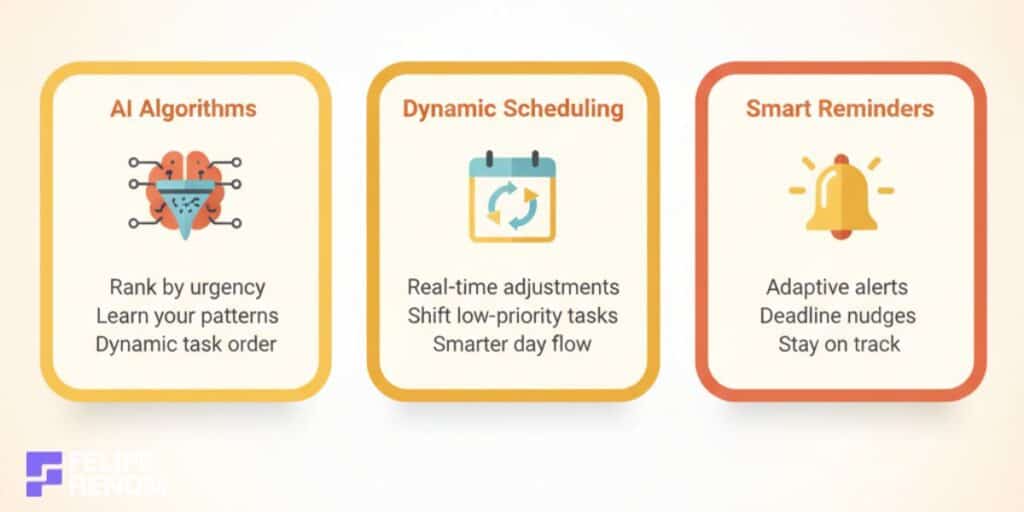
AI can help you focus on the most critical tasks by using algorithms to sort your workload by urgency and importance. Back in the day, I would often misjudge which tasks needed immediate attention. No more!
- Use AI tools to rank tasks based on deadlines and their impact.
- Implement algorithms that learn over time, adapting to your specific work style.
- Let AI suggest reordering of tasks dynamically as new ones appear.
I’ve been integrating AI into daily routines that can forecast which project’s due date is creeping up sooner and make instant adjustments. It ACCURATELY prioritizes what truly matters in seconds.
The biggest revelation: Trusting AI instincts has helped declutter my mental space, allowing more room for creativity.
Dynamically Adjust Your Schedule with AI
With AI, your schedule is never set in stone, it’s a living, breathing entity that shifts as per real-time demands. Initially, juggling multiple client meetings was chaotic until I harnessed AI-driven scheduling tools.
- AI can reschedule low-priority tasks when a high-priority task arises.
- Use AI suggestions to fine-tune your daily agenda with minimal effort.
A tool like Trello with AI integrations helped me move tasks around without breaking a sweat. Suddenly, my day felt more like a well-choreographed dance than a chaotic marathon.
AI empowers you to adapt efficiently. Always be open to shifts if they bring about better outcomes.
Don’t Just Plan, Execute with AI-Driven Reminders
A plan is only as good as its execution. I’ve found AI-driven reminders to be immensely useful in keeping me on track, especially with overlapping deadlines.
- Integrate reminders for crucial deadlines and milestones.
- AI reminders adapt to changes, meaning no last-minute surprises.
For instance, Notion’s AI-powered notifications have nudged me towards timely project submissions, preventing potential oversights. Now, missing deadlines is a thing of the PAST.
Consistency is king. Utilize AI-driven reminders to keep from veering off course.
By understanding how to use AI for time management, you unlock a world where chaos turns into clarity. Letting AI manage your task prioritization not only slashes stress but enhances productivity. It’s all about working smarter, not harder. AI simplifies your workload, turning the daunting into the doable.
Automate Repetitive Tasks with AI
I remember when my days used to be filled with the same repetitive tasks day in and day out. It felt like I was on autopilot, drowning in routine. But discovering how to use AI for time management CHANGED EVERYTHING. By automating these boring tasks, I’ve freed up countless hours to focus on what truly matters.
Identify Tasks Suitable for Automation
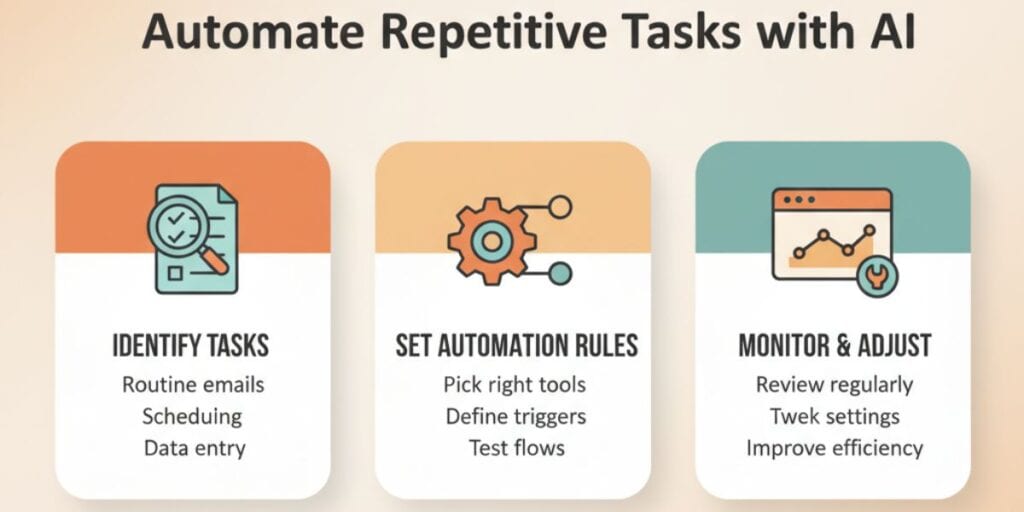
The first step is pinpointing what tasks are truly repetitive and ripe for automation. In my freelance journey, recognizing these energy-draining tasks was eye-opening.
- Routine Emails: Replying to the same questions over and over? Let AI chatbots handle it.
- Scheduling Meetings: Tools like Google Calendar with AI integrations can auto-schedule based on availability.
- Data Entry: Automate with tools such as Integromat (Make) for smoother data transitions.
When I identified these tasks, I realized automation would not only save me time but also SANITY. This realization marked the beginning of reduced work hours and increased productivity.
My main takeaway: Automation is your ally. Focus on tasks that eat up time but offer minimal return.
Set Up Automation Rules within AI Tools
Given the right tools, setting up automation is more straightforward than you might think. Trust me, I was surprised by how intuitive it became once I dove in.
- Choose the Right Tools: Notion and Zapier can automate complex workflows efficiently.
- Define Clear Rules: Specify what actions should trigger each automated task.
- Test Before Launch: Run a trial to ensure each automation functions as planned.
In my case, automating email replies, setting up invoice reminders, and even automating data tracking tasks saved me from HOURS of grunt work.
| Task | AI Tool | Functionality |
|---|---|---|
| Email Automation | Zapier, Notion AI | Sends autoresponders, queries |
| Data Entry | Integromat (Make) | Automates info updates |
| Scheduling | Google Calendar AI | Manages appointments & reminders |
Lesson learned: Developing a solid plan for testing means fewer hiccups down the line.
Monitor Automated Processes for Adjustments
Lastly, don’t just set it and forget it. Monitoring is crucial to ensure everything runs smoothly. In my own process, I’ve had to make adjustments that kept my systems efficient.
- Regular Check-ins: Periodically review automated tasks to ensure they’re up-to-date.
- Adjust as Needed: AI isn’t perfect, sometimes tweaks are necessary.
- Gather Feedback: Take note of how well automation serves your needs and adjust accordingly.
Initially, I set up automations and walked away. That was a MISTAKE. By not regularly checking in, minor issues went unnoticed until they snowballed. Now, I routinely review and tweak for optimal results.
Always remember: Automation is dynamic. It evolves and needs occasional supervision to stay sharp.
By honing how to use AI for time management, not only do you reduce your workload, but you elevate your efficiency. Automation isn’t just a luxury; it’s a necessity in this fast-paced world. Don’t let routine bog you down, let AI handle it, and watch your productivity soar!
Monitor and Adjust Your Time Management Strategies
It’s funny how even when you THINK you’ve nailed your time management, there’s often room for improvement. The key to unlocking maximum productivity lies in those continuous tweaks and adjustments. Nothing stays static, especially with AI. The tools you’re using today might evolve tomorrow, and staying adaptable is vital.
Assess Effectiveness of AI Tools
Regularly assessing how effective your AI-driven time management practices are is like getting a health check-up, it ensures everything’s running smoothly. I learned this the hard way when I ASSUMED everything was working perfectly, only to realize my tools were outdated.
- Review Performance Metrics: Use analytics offered by your AI tools to understand productivity levels.
- Gather Feedback: Talk to team members or reflect personally on whether the AI meets current needs.
- Identify Bottlenecks: Pinpoint areas where productivity drops and explore alternatives.
In my journey, I noticed that some AI time management tools initially boosted efficiency but began to lag as projects scaled. Regular assessments led me to replace or upgrade them effectively.
Key takeaway: Regular evaluations keep your systems efficient and ensure you’re not just coasting but OPTIMIZING.
Analyze Productivity Reports
AI is not just about automation; it’s about understanding DATA. Analyzing productivity reports generated by AI tools gives insights into what’s really happening behind the scenes.
- Monitor Trends: Are certain days more productive? Why?
- Evaluate Task Completion Rates: Highlight which tasks lag and why.
- Use Findings to Adjust: Be open to changing strategies based on findings.
Analyzing reports helped me uncover unexpected trends, like why Friday afternoons were less productive. The data helped reallocate tasks to better-suited times, boosting efficiency dramatically.
| Report Area | Insight Gained | Action Taken |
|---|---|---|
| Daily Trends | Lower productivity Fridays | Moved complex tasks earlier |
| Task Completion | Delays in specific chores | Prioritized differently |
The insights AI provides can sometimes be SURPRISING, revealing opportunities you’ve overlooked.
Stay Updated with AI Innovations
Sticking with stagnant tools is like going to work with outdated gadgets. It’s essential to stay updated with new AI features or tools to enhance efficiency continuously.
- Subscribe to Updates: Follow newsletters or AI communities to learn about the latest tools.
- Be Open-Minded: New tools might offer features that better align with current needs.
- Test Innovations: Take new features for a test drive before fully integrating.
Keeping up with emerging tools means better alignment with needs. I recently transitioned to an AI tool offering advanced prediction capabilities, and it REDEFINED my workflow efficiency.
Be adaptable. The landscape shifts; your strategies should, too.
How to use AI for time management should never be a set-and-forget strategy. Instead, it involves an active, ongoing process of evaluation and adaptation. By doing this, you ensure that your methods remain cutting-edge, aligning perfectly with your ever-evolving needs. AI doesn’t just solve today’s problems; it prepares you for tomorrow’s challenges!
Key Considerations For Successfully Using AI for Time Management
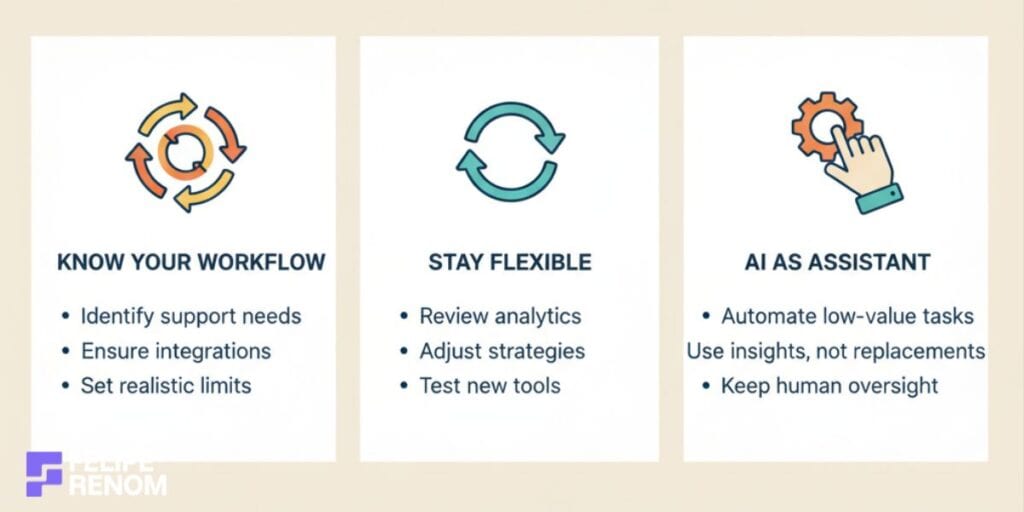
Understanding the balance between YOUR workflow and AI’s tech capabilities is CRUCIAL for effective time management. It’s not just about plugging in a tool and walking away. That’s one mistake I learned early on when I thought AI would make decisions for me. Rather, AI serves as an assistant, enhancing your decision-making, NOT replacing it.
Understand Your Workflow and AI Capabilities
Before diving headlong into the AI pool, take a close look at your existing workflow. Recognizing where AI can help is key to leveraging its full potential. I learned this the hard way when AI initially exacerbated my disorganization.
- Analyze what tasks you need support with, such as scheduling or task prioritization.
- Ensure AI tools align with current systems, integration should be seamless, not disruptive.
- Be aware of limitations. AI is NOT a magic wand; set realistic expectations.
Understanding your workflow allows you to identify how AI enhances efficiency, rather than becoming a productivity hurdle.
Always remember: “The right AI tool can transform your business processes, but a mismatch can bring chaos.”
Remain Flexible and Adapt Strategies
When using AI, always be ready to adapt and change tactics. Flexibility is your best companion. I learned that as well when my initial setup didn’t yield the results I expected.
- Regularly review analytics offered by AI tools to see what’s working, or not.
- Use insights gained to tweak and adapt your strategy accordingly.
- Experiment with different tools to find the best fit for evolving needs.
Consider my experience: I initially used an AI scheduling tool that seemed perfect but didn’t fit long-term. By being open to new options, I discovered an AI that was more adaptable to my fluctuating schedule.
- Adjustment is ongoing: Your strategies should continuously evolve with your goals.
- Insights lead to improvement: Use them to refine your approach routinely.
- Experiment and evaluate: Even wrongly chosen tools provide learning opportunities.
AI must serve YOU, not the other way around. Flexibility ensures your time management remains effective and efficient.
Use AI as an Assistive Tool, Not a Replacement
Many people have this misconception that adopting AI means handing over control. That couldn’t be further from the truth. It’s designed to aid your decision-making process, not take over entirely.
- Leverage AI to handle repetitive, low-value tasks, like data entry or simple correspondence.
- Use its analytics features to inform strategic decisions, like altering project timelines.
- Incorporate constant human oversight, AI lacks the nuance you innately possess.
In my projects, I often relied on AI for routine data analysis but always performed a high-level review. This blend ensured efficiency without losing the quality of human judgment.
| Task | AI Role | Human Oversight |
|---|---|---|
| Data Entry | Automates entries | Reviews accuracy and trends |
| Scheduling | Suggests optimal meetings | Confirms relevance and purpose |
Biggest takeaway: AI’s brilliant, but it works best when paired with human insights, never underestimate your own intuition.
By understanding how to use AI for time management, you turn lofty goals into achievable ones. So, keep your approach flexible, know your tools, and let AI be an enhancer, not a replacement. Embrace the learnings and adjustments, you’ll be AMAZED at the productivity transformation!
Taking it to the Next Level: How to Optimize AI Time Management
Ever felt that sudden rush when you realize AI has saved you yet another hour? It’s like being gifted more TIME in a 24-hour day. But don’t settle for just “good enough”, let’s dive into optimizing how to use AI for time management, so we can keep climbing to the NEXT level of productivity.
Explore Advanced AI Features & Custom Integrations
Here’s where it gets really interesting. By tapping into advanced features and custom integrations, you’re not just saving time, you’re redesigning how work flows. In my own journey, I found advanced AI features often lead to the most significant productivity leaps.
- Automation: Leverage AI to automate complex workflows beyond simple tasks. Think beyond email sorting to full-fledged project management automation.
- Custom Integrations: Use APIs to connect AI tools with existing systems. For instance, syncing a CRM with an AI algorithm to predict client needs automatically. When I worked on an AI system for a clinic, it made client management remarkably smooth and efficient.
- Predictive Analytics: Use AI to foresee potential roadblocks or deadlines, enabling a PROACTIVE, rather than reactive, approach.
| Feature | Benefit | Example Use Case |
|---|---|---|
| Predictive Analytics | Proactive decision-making | Anticipating client needs in real-time |
| Custom API Integrations | Seamless workflow connection | Integrating AI with CRM for data syncing |
Advanced features can be intimidating, but they often bring the biggest breakthroughs.
Stay Informed About AI Developments
AI is constantly evolving, and keeping up with developments can feel like drinking from a fire hose. But I’ve found that staying informed ensures you’re ALWAYS one step ahead.
- Subscribe to Industry News: Sign up for newsletters or blogs dedicated to AI developments, you’ll often find golden nuggets of info in there.
- Join AI Communities: Engaging with forums like Reddit or specialized LinkedIn groups can provide fresh insights directly from experts and users navigating similar waters.
- Participate in Webinars: Online events are great for learning about new tools and strategies from the pros.
Not long ago, I attended an AI webinar that blew my mind on how AI could further enhance process automation. This ONE session led me to incorporate a system that saves a ton of time every week for one of my clients.
Adopting a learning mindset keeps your AI toolset sharp and ensures it evolves alongside the technology.
Engage With AI Communities for Shared Insights
You’re not alone in this journey; there’s a whole world of AI enthusiasts and experts just a click away. By diving into communities, I’ve learned SO much and built relationships that have enriched my professional life.
- Share Experiences: Discuss triumphs and setbacks to gain perspectives you might have overlooked.
- Seek Feedback: Pose questions or challenges you’re facing and receive diverse, often creative, solutions.
- Contribute Learnings: Sharing what you’ve learned builds credibility and helps others, creating a community of continuous improvement.
For instance, connecting with other AI developers on Slack led to the discovery of a novel way to streamline data processes for a COMPLEX client project. It was a revelation!
Being active in communities not only fortifies your own understanding but nurtures the entire ecosystem of knowledge sharing.
Remember, optimizing AI isn’t about working harder; it’s about working SMARTER. By embracing advanced features, staying informed, and engaging with fellow AI enthusiasts, you’re not just managing time, you’re mastering it. Let’s continue to push the boundaries and maximize what AI has to offer in our pursuits of efficiency!
Alternatives to AI for Time Management
Let’s be honest, AI is FANTASTIC, but it’s not the be-all and end-all of time management. While AI offers some slick features, traditional techniques can still be incredibly effective. In fact, combining AI with manual methods creates a balanced and personalized approach. So, don’t toss those old-school tricks aside just yet!
Traditional Techniques: Timeless and Effective
Believe it or not, techniques like the Pomodoro Technique and the Eisenhower Matrix can still give AI a run for its money. When I was transitioning into freelancing, the Pomodoro Technique was my go-to. It might sound simple, but it’s so powerful!
- Pomodoro Technique: Focus on a task for 25 minutes, then take a 5-minute break. It’s remarkable for maintaining focus and avoiding burnout.
- Eisenhower Matrix: Organize tasks based on urgency and importance. By distinguishing tasks into four quadrants, you prevent getting bogged down by unimportant work.
These practices have been game-changers in my productivity arsenal. The Pomodoro Technique, in particular, kept me from spiraling into an endless loop of work, giving my mind the much-needed breathers it craved.
| Technique | Focus Area | Best For |
|---|---|---|
| Pomodoro | Time Focused (Breaks) | Maintaining concentration |
| Eisenhower Matrix | Task Prioritization | Balancing urgency and importance |
The greatest insight? Sometimes simplicity can outstrip complexity when regaining focus and peace of mind.
Hybrid Approach: The Best of Both Worlds
The real magic happens when you blend AI’s capabilities with human intuition. This synergy allows for tailored solutions that cater to your unique workflow. Early in my career, I thought I had to choose between AI and manual methods, it never crossed my mind that they could work TOGETHER.
- Use AI for Data: Let AI handle information-gathering and repetitive tasks.
- Rely on Intuition for Creativity: Trust your gut in creative and strategic decision-making areas.
When working with clients, I use AI tools for appointment scheduling while following the Eisenhower Matrix for strategic priorities. This COMBINATION resulted in a workload that flowed more naturally and freed up time for creative tasks.
A personal lesson: AI should support, NOT replace, your strategies. It’s there to ease the load, not define it.
Consider time management as a vast toolbox. AI brings dazzling modern gadgets working in tandem with traditional tools that have stood the test of time. This hybrid approach ensures that you are using the best resources for the job, maximizing productivity, and keeping stress at bay. Isn’t it time you harnessed both sides?
Final Thoughts
Mastering how to use AI for time management can dramatically transform your productivity landscape. By identifying your time management needs, selecting the right tools, and integrating them seamlessly into your daily routine, you’re setting yourself up for success. Now, it’s time to take action. Start by reflecting on your current workflow and explore AI tools that align with your goals. Implement these strategies, and watch as AI guides you toward achieving a more balanced and efficient lifestyle.
Continue Reading: Ready to take it further? Read How to Use AI for Productivity to explore even more ways AI can enhance your daily tasks and streamline your work processes.